
Built-in agents
Which providers each agent uses
An agent lists a model only when the model serves an API that the agent supports, so a gateway such as OpenRouter can show a model to one agent and not another. The three model APIs are OpenAI Responses, OpenAI Chat Completions, and Anthropic Messages:- Responses only: Codex.
- Messages only: Claude Code.
- Chat Completions and Messages: Qwen Code.
- All three: GitHub Copilot, Grok Build, OpenCode, Pi, Hermes, and OpenClaw.
- Their own API: Cursor (Cursor’s) and Antigravity (Gemini).
Some combinations have extra limits:
- Google Gemini API and xAI models don’t serve Anthropic Messages, and Gemini models don’t serve Responses. So Claude Code lists no models from either, and Codex lists none from Gemini.
- On OpenRouter, Claude Code uses only
anthropic/claude…models. - Each personal integration runs only its own agent: ChatGPT Subscription runs Codex, Claude Subscription runs Claude Code, GitHub runs GitHub Copilot, and Nous Portal runs Hermes.
- Grok Build can use a Claude model over Messages only when the model supports adaptive thinking, so on Anthropic it can’t use Claude Sonnet 4.5, Haiku 4.5, or Opus 4.5.
- Hermes can’t use an Anthropic-compatible provider that needs custom headers.
- Cursor needs a key from a paid Cursor plan, and GitHub Copilot needs a paid Copilot plan.
Turn on an agent
Agents are turned on or off per project. Manage → Agents lists every agent with its model providers and an Enabled switch.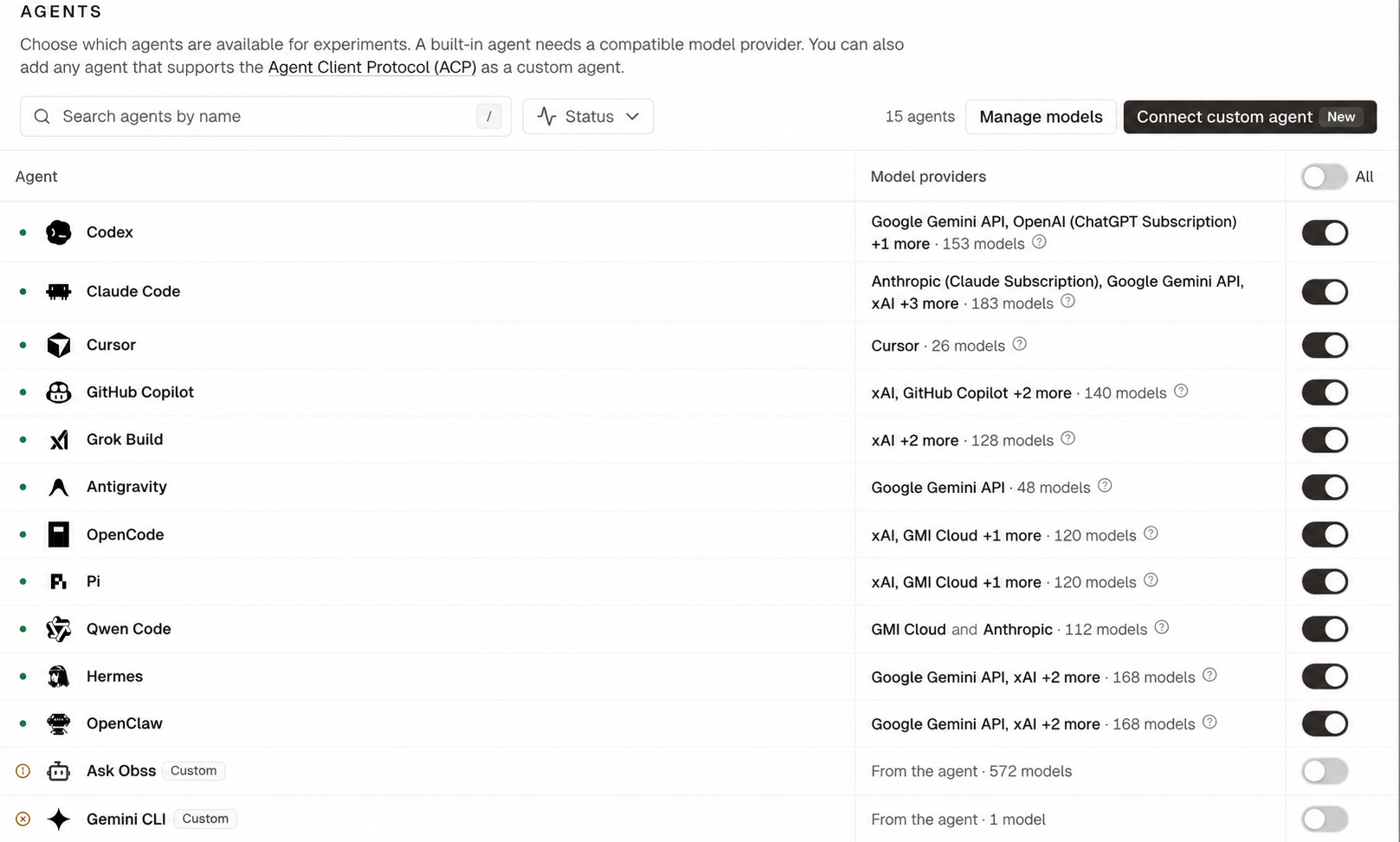
- Dashboard
- CLI
- Plugin (MCP)
- Connect a provider that the agent uses, under Organization settings → Model providers or Profile → Integrations.
- Open Manage → Agents.
- Turn on the agent’s Enabled switch, then select Save changes.
Choose a model and effort
When you launch an experiment, choose an agent, one or more of its models, and an effort level if the model supports one. Levels runnone, minimal, low, medium, high, xhigh, max, and the picker shows only the ones the model lists.
Default sends no effort level, so the agent uses its own default. The one exception is Cursor, which uses the default variant Cursor lists for the model.
How agents run
Each run uses the agent as its vendor ships it, with the provider and model you chose. Obss changes the agent’s settings only where a run needs it:- No one answers prompts during a run, so the agent never asks for approval, asks questions, or asks you to sign in.
- The agent calls only the provider and model you chose.
- Agent and model versions are pinned for each run, and the agent doesn’t update itself.
- The agent records more detail about its work, such as reasoning summaries.
- The run ends when the agent finishes its own work. Obss waits for subagents and workflows the agent started, but not for processes it left running, such as a dev server.
These run settings can make runs cost more and take longer. At Default effort, OpenClaw applies its own reasoning level for the model, Codex and Grok Build can make billed web searches, and Claude Code waits for the subagents and workflows that it started.
An agent’s page and runs
Select an agent on Manage → Agents to open its page:
A removed agent keeps its page and these tabs while it has runs.
From the CLI and the plugin, filter
obss experiments list, obss runs list, or obss frictions list by the agent’s key, such as --agent-id claude-code (agent_id). A run’s agentId is that key. For one model, pass --agent-model-id (agent_model_id) with an agm_ ID from obss catalog list --kind agent.
Custom agents
Custom agents are in private beta. Email support@obss.app to enable them for your organization.