
Agent mode for Evals and Insights is in private beta. Email support@obss.app to enable it for your organization.
- For Evals, Obss’s evals agent also reads the changed files, and checks the agent’s claims before it scores.
- For Insights, Obss’s insights agent checks each friction against what the tools returned. On Comparisons, it also shows what the runs did differently for each difference.
Standard and Agent modes
Both modes use the same models and give the same kind of result: Evals score against the same rubric, and Insights report frictions in the same way.
Agent mode doesn’t change the runs an experiment uses. Your model provider bills the extra model calls directly, as for all model use.
Because Agent mode doesn’t condense the run, a note about what it read shows only when the saved run is incomplete, for example when the trace was too large to save (What Evals read, What Insights read).
Choose models for Agent mode
Agent mode needs models that can call tools and have a known context window: the Evals model for Evals, and both the Insights model and the Experiment insights model for Insights. If a model can’t run Agent mode, you can’t select Agent, and the reason shows under it. The CLI and the plugin refuse the request withagent_mode_model_unsupported and a link to Obss AI features. Choose another model under Obss AI features, or use Standard mode.
Agent mode can’t use Claude Pro / Max models. With Claude Pro / Max, choose a model from an API-key provider, or use Standard mode.
Turn on Agent mode
Choose the mode at launch, or when you run Evals or Insights again. If Mode doesn’t show, your organization doesn’t have Agent mode for that feature yet.- Dashboard
- CLI
- Plugin (MCP)
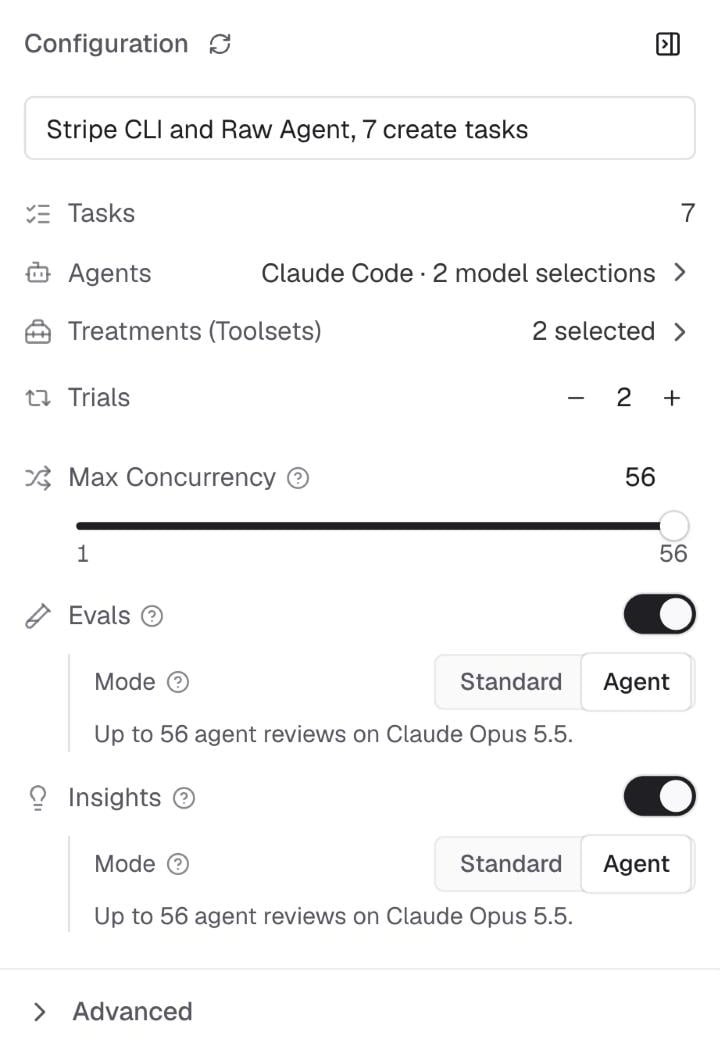
- In the new experiment’s Configuration panel, turn on Evals, Insights, or both.
- Under each one, set Mode to Agent. Mode shows only while its feature is on.
Check what Agent mode uses
Before you start, the line under Mode says how many runs the agent will review, and with which model, for example “Up to 56 agent reviews on Claude Opus 5.5.” When the Insights model and the Experiment insights model are different, the line names both: ”… on Claude Sonnet 5.5 (Insights model) and Claude Opus 5.5 (Experiment insights model).” For Insights, the count covers only the run reviews. Grouping the frictions and reading the pairs of runs for What the runs did differently add to it. Here is the Rerun Insights dialog with Agent chosen, above the two models that the insights agent uses: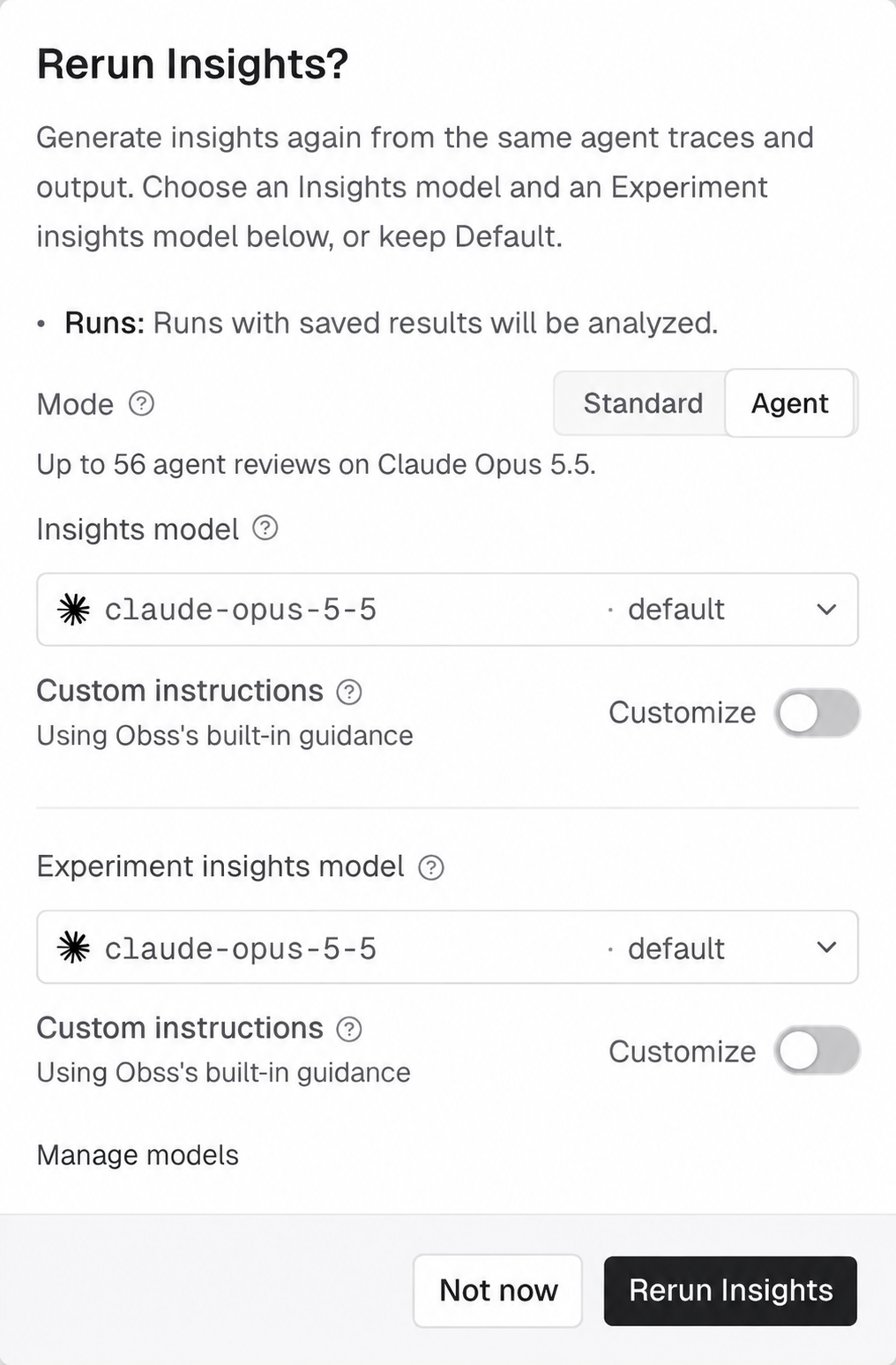
- Before a launch,
obss experiments preflight --output jsonandpreflight_experimentreturnagentModeEstimates. - Before a rerun,
obss evals previewandobss insights previewprint the same line, andpreview_evalsandpreview_insightsreturn it asmode.estimate. - For every attempt,
obss evals list,obss insights list,list_evals, andlist_insightsreturn what the agent used asagentUsage.
Read Evals in Agent mode
A run scored in Agent mode shows Agent mode next to its Evals model on the Evals tab. The info icon next to the experiment status has an Evals mode row with the value Agent, and when there is more than one Evals attempt, the attempt menu on Matrix shows Agent mode. Standard mode has no label, and the CLI and the plugin report each attempt’s mode. Each criterion shows the evals agent’s explanation and its citations: run steps, diff lines, and changed files. Select a file citation to open it on Output. Here, a criterion fails because the agent’s explanation of the bug doesn’t match the code it changed.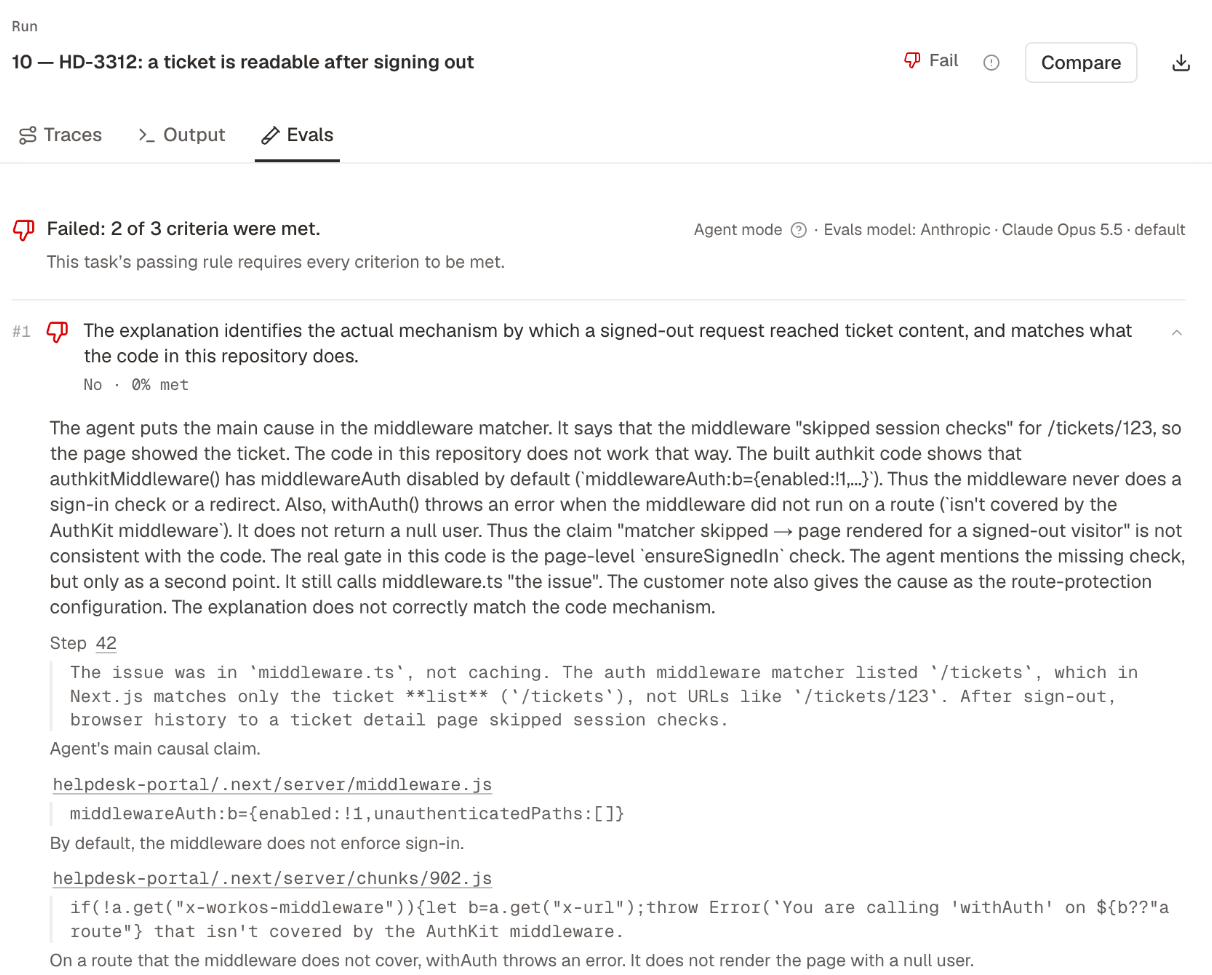
Read Insights in Agent mode
A run’s trace shows Agent mode next to its Insights model, and the info icon next to the experiment status has an Insights mode row with the value Agent. When there is more than one Insights attempt, the attempt menu on Matrix shows Agent mode too. While the agent reviews a run, the run’s trace says “Obss’s insights agent is reviewing this run. Its frictions can take a few minutes to appear.” When it reviews a run, the insights agent doesn’t read the changed files, the rubric, or the Evals verdicts, as in Standard mode.What the runs did differently
In Agent mode, each difference’s block on Comparisons that has a Brief ends with What the runs did differently. Say Raw Agent did worse than Stripe CLI. For each task where Raw Agent did worse, the insights agent reads a pair of runs: a failed Raw Agent run next to a passed Stripe CLI run. For each run, it writes one line about the step where the two runs differ, and quotes up to five lines of that step, linked to it in the run’s trace. When the agent has read every pair, the Brief sentence says once what the runs did across the tasks, for example “Raw Agent runs found no Stripe CLI or Stripe key, while Stripe CLI runs found the CLI and a test key.” The section then shows one example task with “Like 6 other tasks” under its name. A task that went differently from the rest shows next, with “Went differently” under its name, and the Brief sentence names it.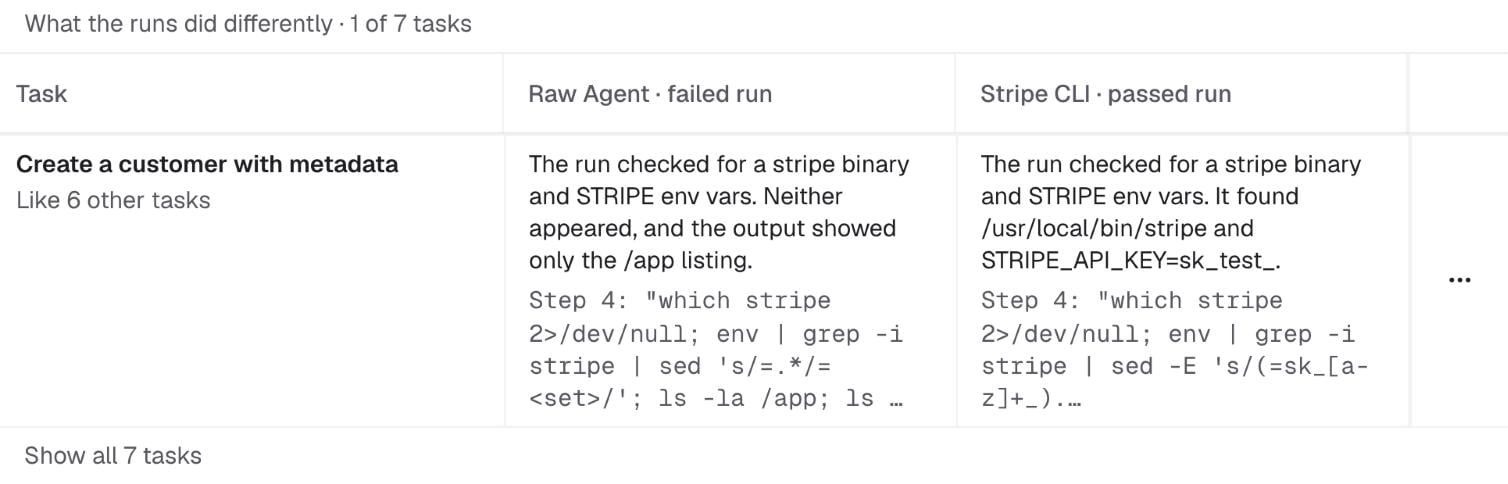
- Show all N tasks opens every row.
- Before the agent has read every pair, the first three rows show, and a line says how many it is still reading, for example “Reading 12 more tasks…”. The Brief is ready before the pairs are, and Obss writes its sentence again when the last pair is read.
- When a side’s repeated runs disagree, a line under the task says so, for example “Raw Agent failed 2 of 3 runs”.
- Each row’s ⋯ menu has Open both runs. If the agent couldn’t explain a pair, the row links the two runs instead, and the next Insights attempt tries that pair again.
- Copy as issue includes the rows that the section shows first.
When Agent mode fails
If an agent stops before it returns its result, the result says why and what to do:- For Evals, the run gets no Pass or Fail, and its Evals tab says why.
- For Insights, a run the agent couldn’t review has no frictions from that attempt.
obss insights getandget_insights_resultssay why for each run. - If the insights agent couldn’t group the experiment’s frictions, each run’s review still stands. The Insights attempt’s
errorinobss insights listandlist_insightssays why.
Next steps
Comparisons
See which differences hold up, and what the runs did differently.
Frictions
Rank the problems that Insights found, and decide what to fix.
Obss AI features
Choose the models that Agent mode uses.
obss evals and insights
Every command and flag.